Social Icons

Showing posts with label Tips and Tricks. Show all posts

Monday, September 23, 2013

How to Hide Apps from Your Home Screen in iOS 7


  1. Fill up your home screen with apps. Keep one folder on the home screen. 
  2. Place all the apps you want to hide away in a folder in the dock. 
  3. Tap and hold that folder while double-pressing the home button to open up the app switcher. 
  4. Switch back the home screen. 
  5. Tap the folder on the home screen (the one you don't want to hide). 
  6. Back out to the home screen again. 
  7. Press the home button.


Read More

Tuesday, September 10, 2013

Make your computer speak what you type


Using your PC's built in features and some VBScript you can create a simple program that will make your computer speak whatever you input to it.

To create the script, follow the steps given below:-

  • Open Notepad.
  • Copy and paste the exact code given below.

    Dim Message, Speak
    Message=InputBox("Enter text","Speak")
    Set Speak=CreateObject("sapi.spvoice")
    Speak.Speak Message

  • Click on File Menu, Save As, select All Types in Save as Type option, and save the file as Speak.vbs or "*.vbs"
  • Double click on the saved file, a window will open like the below image. Enter some text and click OK.


Read More

Thursday, August 29, 2013

Find your lost android phone/tablet with Device Manger.


Find your lost android phone/tablet with Device Manger

This applies to almost anyone who owns an Android phone/tablet running at least Android 2.2 and has Google Play installed.

Click here to see the Google announcement Google Announcement

Follow the instructions below to activate it,

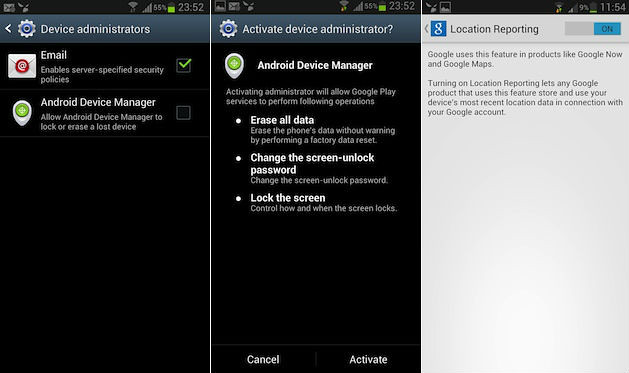
1. go to Settings > Security > Device Administrators
2. and tick Android Device Manager, and tap on Activate.
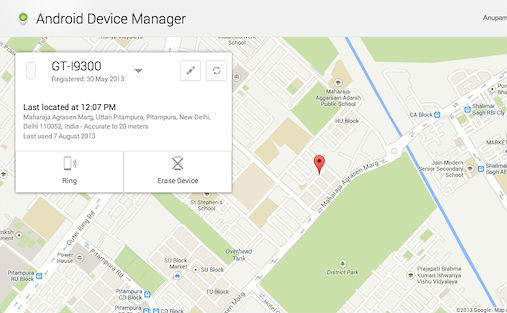
3. You can then, from any Web browser, locate your phone via the Web interface Web Interface Link.


You'll also be able to
  • track its location on Google maps
  • ring the device at full volume for five minutes 
  • and even erase all the data. 
The web interface allows you to track multiple Android devices through a drop-down menu and you can also rename your Android devices through it.

Note:
Location tracking might not work if Google location settings have not been enabled. You can enable these settings through the 'Location' menu from Settings to allow Google services to track your location


Read More

Thursday, August 30, 2012

Download Videos from Youtube without any Software

Have you find your favorite video on the most famous Youtube and not able to watch it because of no time to sit infront of the computer and buffer it. Here is a smart way to download it, it hardly takes 10-15 minutes for 600MB. Once you have video in your hand, you got your ways to watch it right??...Smart Phones...Tablets....Enjoy folks.....:)

Step 1. Open your favourite Video in youtube and copy its url
Download Youtube Videos Online


Step 2. Open www.keepvid.com and paste url and click on download
Download Youtube Videos Online


Step 3. Allow Java Applet to run by ticking the check box & clicking on Run
Download Youtube Videos Online


Step 4. Click on required format and save to your local disk
Download Youtube Videos Online
Read More